
TimeKeeper Core & TimeKeeper Pro: What's the Difference?
TimeKeeper Core vs TimeKeeper Pro
TimeKeeper offers two main plans: Core and Pro. Both provide powerful time and attendance tools, but they’re designed for slightly different types of businesses and use cases.
TimeKeeper Core
TimeKeeper Core is the foundational plan that includes all the essential features needed for tracking employee time and attendance. It’s ideal for businesses that need a simple, reliable solution for managing work hours, breaks, and attendance at fixed workplaces.
Core features
Employee Time Tracking
Record work hours, clock‑in/clock‑out times, and break periods.Attendance Management
Track late arrivals, absences, and annual leave.Timesheet Management
Generate and approve timesheets for payroll processing.Employee Scheduling
Create and manage shift schedules for your team.Reporting
Access reports to view timesheets and employee attendance.Payroll Integration
Seamlessly integrate with payroll systems.
Core plan – Locations
Core uses Locations to represent fixed workplaces:
Ideal for static sites such as offices, warehouses, and restaurants.
Staff clock in/out at a location (often via a shared kiosk).
You can add a geoboundary, mainly to record where clock‑ins happen rather than strictly enforcing that staff are on site.
If someone clocks in slightly outside the boundary, the clock‑in still works; the report shows their actual GPS/address.
In short, Core provides a streamlined way to handle basic time tracking and attendance at fixed locations, keeping businesses organised and compliant.
TimeKeeper Pro
TimeKeeper Pro includes everything in TimeKeeper Core, plus advanced tools for job‑based tracking and control. It’s ideal for businesses where employees move between sites, or where you need detailed insight into how time is spent on specific jobs or projects.
Pro features (in addition to Core)
Job & Project Tracking
Track employee time against specific jobs, projects, or tasks to monitor productivity and budgets.Advanced Reporting
Access detailed reports that break down hours by job, project, or department.Job Costing
Estimate and monitor costs for specific jobs or projects, helping you stay on budget.Payroll Integration (Job‑based)
Integrate with payroll systems for accurate job‑based payroll processing.
Pro plan – Jobs
Pro introduces Jobs with geofencing:
Ideal for mobile or site‑based work, where staff move between clients or sites.
Staff clock into a specific Job when they arrive on site.
Jobs use geofencing: staff must be inside the job’s geofence to clock in/out.
If they’re outside the fence, the clock‑in/out is blocked, and an error message is shown.
Summary: Core vs Pro
TimeKeeper Core + Locations + geoboundary
Best for fixed workplaces, primarily recording where clock‑ins happen and managing standard time and attendance.TimeKeeper Pro + Jobs + geofence
Best for mobile/site‑based work, enforcing that staff are physically on site to clock in/out and giving detailed job‑level reporting and costing.
TimeKeeper Pro is perfect for businesses that need to track time and attendance across multiple projects or want more granular reporting capabilities to manage costs and optimise productivity.
Can I switch between TimeKeeper Core and TimeKeeper Pro?
Yes, you can switch between TimeKeeper Core and TimeKeeper Pro at any time. Whether you start with TimeKeeper Core and later want to upgrade to Pro, or if you're on TimeKeeper Pro and decide that Core is a better fit, the process is straightforward.
Here’s how you can switch plans:
Log in to the TimeKeeper Web Portal
Navigate to Account > Billing
Select Manage My Subscription
From here, you can choose the plan tier you'd like to switch to, either TimeKeeper Core or TimeKeeper Pro.
This change will be processed through Stripe, our payment partner, and you'll be billed according to your new plan.
Alternatively, you can upgrade by going to the Job tab and upgrading from that screen directly.
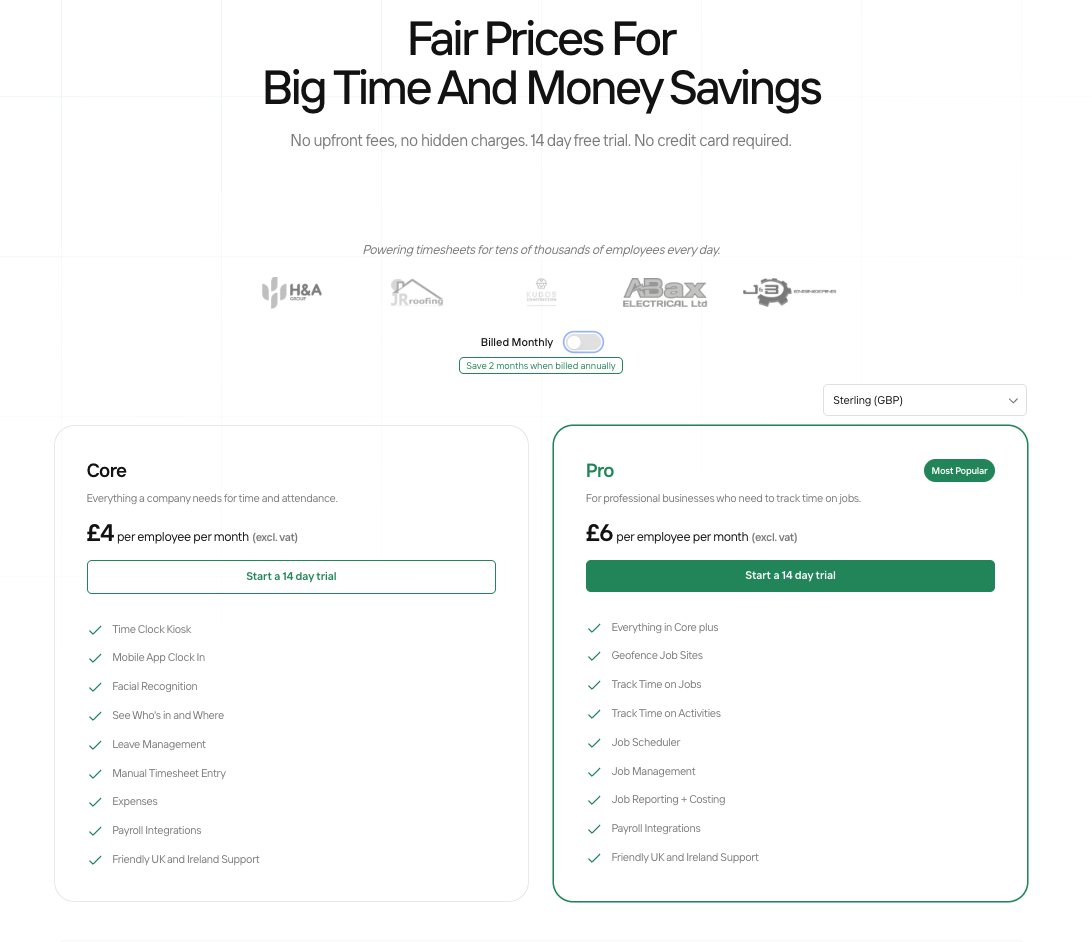
How do I see a comparison of features?
To help you understand the differences between TimeKeeper Core and TimeKeeper Pro, we've created a comprehensive rubric on our website that outlines all the features included in each plan. This will help you decide which plan best suits your business needs.
We hope this article will help with explaining the difference between TimeKeeper Core & TimeKeeper Pro. If you have any further questions, please reach out to us at [email protected]